
Count it. Post it. Done.
Scan shelves with a phone, see every difference as you go, and post the count to your books in one step. No clipboards. No retyping.

Counting without the clipboard.
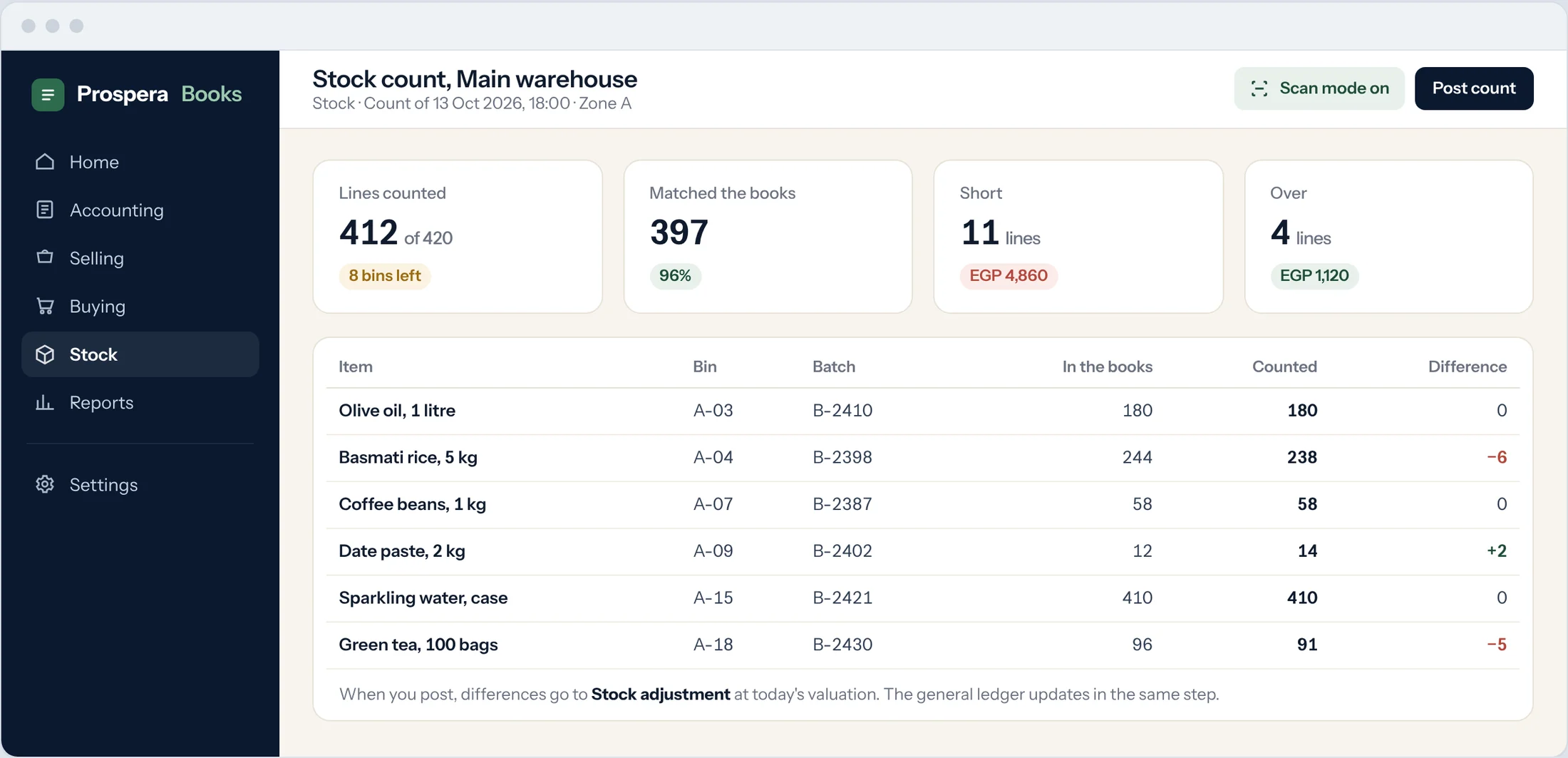
Pick a warehouse, a date and a time. Prospera Books fills in what the books say. Your team fills in what is really there.
Starts from the books
Quantities and values are pulled in for every item in the warehouse, as at the moment you choose.
Scan or upload
Scan barcodes to count line by line, or fill in a sheet in Excel and upload it.
Differences, valued
Short and over lines are priced at current valuation, so you know what the count costs before you post it.
The count happens where the stock is.
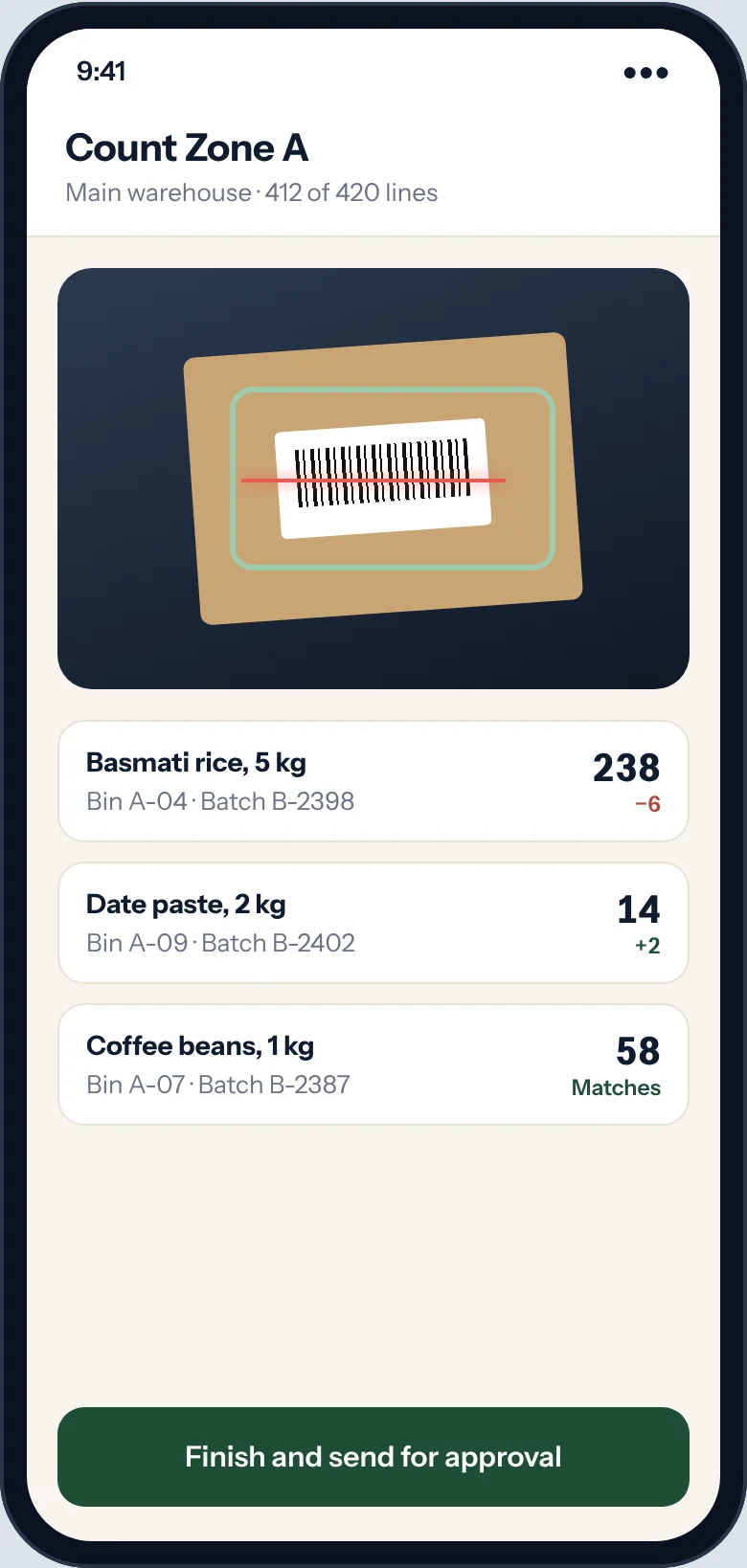
Your team counts on a phone, aisle by aisle. The office sees progress as it happens.
Phone in hand
Count in any phone browser. Scan mode adds each item the moment it is scanned.
Each counter, their zone
Give each person access to their own warehouse only. Nobody counts the wrong shelf.
Approve before it posts
A manager reviews the differences and posts. Until then, nothing in the books changes.

Count as a team. Post once.
Split the warehouse between people, count in parallel, and post one adjustment. The general ledger updates in the same step.
Batches, serials and expiry dates. Counted too.
Count by batch or serial number, and see what expires next before it becomes a write-off.


Every batch on its own line
Count and adjust each batch and serial number, not just the total.
Expiry in plain sight
A list of what expires in the next weeks, so you can move it to the front.
Traced end to end
See which supplier a batch came from and which customer it went to.
Low stock reorders itself.
Set a reorder level once. When stock falls below it, a purchase request is raised and your buyer is told.

Reorder levels per warehouse
Different minimums for the main warehouse and each branch.
Requests raised for you
Purchase requests appear every morning with the quantity to order.
Straight into buying
Turn a request into a quotation request or a purchase order in one step.
What the system says is on the shelf.
Six controls that keep counts right, stock valued correctly and history untouched.
Every location in order
Up to 10 warehouses, grouped into zones and sub-warehouses. Unlimited on Premium.
Grow and PremiumNothing lost between branches
Stock moving between warehouses is tracked in transit until the other end receives it.
Grow and PremiumStock valued the way your auditor expects
Choose FIFO or moving average, item by item, and cost of sales follows on its own.
Grow and PremiumEvery movement explained
Every movement in and out is recorded with its quantity, warehouse and value, so any difference can be traced.
Grow and PremiumHistory no one can rewrite
Stock movements before a date you set are locked against changes.
Grow and PremiumSee what is not selling
See what has sat longest, warehouse by warehouse, before it becomes a write-off.
Grow and PremiumStocktaking comes with Grow.
Grow adds stock, sales and purchasing to the full ledger: up to 10 warehouses, point of sale with loyalty, batches, serials and expiry, and fixed assets. Three people included.
Compare all three plansQuestions.
Do we have to close the shop to count?
No. A count is taken as at a date and time you choose. Sales and receipts after that moment are kept separate, so you can count while you trade.
Can we count one zone at a time?
Yes. Count a warehouse, a zone or a handful of items. Each count is posted on its own.
What happens to the differences?
They are valued at current cost and posted to your stock adjustment account in the same step. The general ledger and stock always agree.
Can we count on paper or in Excel?
Yes. Download the count sheet, fill it in, and upload it. Prospera Books works out the differences.
Who can post a count?
Only the roles you choose. Counters enter quantities. A manager reviews and posts.
Do batches and serial numbers count separately?
Yes. Each batch and serial number is counted and adjusted on its own line.
Your next count. Posted the same day.
Try it free for 14 days with sample stock, or book a demo and we will walk through a count with you.